Homesteady
Designing an AI-Powered Companion for Homesteaders
Role: Product Designer
Project Type: Concept Product / AI Experience Design
Focus Areas: Conversational AI, Mobile UX, AI-Assisted Decision-Making, Information Architecture, Trust & Safety
Tools: Figma, FigJam, Figma Make

Homesteady
Designing an AI-Powered Companion for Homesteaders
Role: Product Designer
Project Type: Concept Product / AI Experience Design
Focus Areas: Conversational AI, Mobile UX, AI-Assisted Decision-Making, Information Architecture, Trust & Safety
Tools: Figma, FigJam, Figma Make
Overview
Overview
Owning a homestead requires making constant decisions about living systems that do not always provide clear answers.
Is a horse acting differently because of the weather, nutrition, stress, or something more serious?
Is a spot on a plant a harmless imperfection or a fungal disease?
When is the right time to prune, fertilize, vaccinate, or prepare for seasonal changes?
Many hobby farmers and gardeners rely on a fragmented mix of online forums, YouTube videos, spreadsheets, veterinary calls, gardening apps, and knowledge gained through years of experience that newer caretakers may not yet have.
Homesteady is an AI-powered homestead companion designed to bring guidance, organization, and reassurance into one place. It helps users better understand changes in their animals and plants, manage recurring responsibilities, and make more informed care decisions.
Owning a homestead requires making constant decisions about living systems that do not always provide clear answers.
Is a horse acting differently because of the weather, nutrition, stress, or something more serious?
Is a spot on a plant a harmless imperfection or a fungal disease?
When is the right time to prune, fertilize, vaccinate, or prepare for seasonal changes?
Many hobby farmers and gardeners rely on a fragmented mix of online forums, YouTube videos, spreadsheets, veterinary calls, gardening apps, and knowledge gained through years of experience that newer caretakers may not yet have.
Homesteady is an AI-powered homestead companion designed to bring guidance, organization, and reassurance into one place. It helps users better understand changes in their animals and plants, manage recurring responsibilities, and make more informed care decisions.
The Opportunity
The Opportunity
Growing interest in small-scale homesteading creates new challenges
More people are raising backyard livestock, growing their own food, and pursuing self-sufficient lifestyles. However, many new hobby farmers encounter the same barriers:
Limited access to experienced mentors
Difficulty identifying health concerns early
Uncertainty about care schedules
Information scattered across multiple sources
Anxiety about making costly or harmful mistakes
Traditional resources often answer isolated questions. Homesteaders need guidance that considers the broader context of their specific animals, plants, environment, experience level, and routines.
Growing interest in small-scale homesteading creates new challenges
More people are raising backyard livestock, growing their own food, and pursuing self-sufficient lifestyles. However, many new hobby farmers encounter the same barriers:
Limited access to experienced mentors
Difficulty identifying health concerns early
Uncertainty about care schedules
Information scattered across multiple sources
Anxiety about making costly or harmful mistakes
Traditional resources often answer isolated questions. Homesteaders need guidance that considers the broader context of their specific animals, plants, environment, experience level, and routines.
How might we help homesteaders confidently care for their animals, crops, and property and stay on top of ongoing tasks?
How might we help homesteaders confidently care for their animals, crops, and property and stay on top of ongoing tasks?
How might we help homesteaders confidently care for their animals, crops, and property and stay on top of ongoing tasks?
Research
Research
Through early concept research and personal experience with small-scale farming, I identified three primary user needs.
1. Immediate guidance when something changes
Animals and plants often communicate through subtle signs. Users need help interpreting:
Changes in behavior
Visible physical symptoms
Environmental conditions
Growth patterns
Weather-related effects
Through early concept research and personal experience with small-scale farming, I identified three primary user needs.
1. Immediate guidance when something changes
Animals and plants often communicate through subtle signs. Users need help interpreting:
Changes in behavior
Visible physical symptoms
Environmental conditions
Growth patterns
Weather-related effects
2. Confidence for less-experienced caretakers
New homesteaders frequently question their own judgment:
“Am I overreacting?”
“Is this normal?”
“Should I continue monitoring or call someone?”
They need guidance that reduces uncertainty without creating false confidence.
2. Confidence for less-experienced caretakers
New homesteaders frequently question their own judgment:
“Am I overreacting?”
“Is this normal?”
“Should I continue monitoring or call someone?”
They need guidance that reduces uncertainty without creating false confidence.
3. A centralized system for ongoing care
Homestead responsibilities are repetitive but easy to overlook:
Feeding schedules
Vaccinations
Irrigation
Seasonal maintenance
Pasture care
Fertilizing
Pruning
Users need one place to organize the ongoing care of their land, animals, and plants.
3. A centralized system for ongoing care
Homestead responsibilities are repetitive but easy to overlook:
Feeding schedules
Vaccinations
Irrigation
Seasonal maintenance
Pasture care
Fertilizing
Pruning
Users need one place to organize the ongoing care of their land, animals, and plants.


Goals
Goals
Reduce uncertainty
Reduce uncertainty
Help users better understand a situation through guided questions, visual analysis, environmental context, and personalized recommendations.
Make complex information accessible
Make complex information accessible
Translate specialized knowledge into clear, practical next steps.
Build trust through transparency
Build trust through transparency
AI recommendations should explain:
What the system observed
What information influenced the suggestion
What information may still be missing
When professional support is recommended
Support, not replace, experts
Support, not replace, experts
Position AI as a first line of support that helps users observe more carefully, ask better questions, and make informed decisions about when to involve a professional.
Exploring Directions
Exploring Directions
I explored several directions for creating an AI experience that felt helpful, transparent, and trustworthy without overwhelming users with technical complexity.
Across concepts, I focused on making AI reasoning and uncertainty visible, using familiar agricultural language, and surfacing relevant care tasks at the right time. The experience also needed to keep users in control, allowing them to review, adjust, dismiss, or defer AI-generated recommendations.
These principles shaped an experience that balanced AI assistance with human judgment. Rather than presenting recommendations as definitive answers, the product was designed to distinguish observations from possibilities, communicate appropriate safety guidance, and provide clear pathways to professional support when needed.


AI Trust & Safety Considerations
AI Trust & Safety Considerations
Because Homesteady provides guidance about living things, responsible AI design is central to the experience.
Communicate limitations clearly
“I can provide general guidance and help you document what you are observing, but I cannot diagnose a medical condition.”
Encourage professional support
Lean on professional support
“This may require professional evaluation. Contact your veterinarian for guidance.”
Avoid false certainty
The experience uses:
Plain-language uncertainty
Evidence-based explanations
Follow-up questions
Professional escalation pathways
Clear distinctions between observations and possible explanations
Prioritize urgent guidance
Prioritize urgency
When potentially serious symptoms are reported, the system surfaces emergency actions before general educational information.
Core Experience
Core Experience
Homestead Management Dashboard
Homestead Management Dashboard
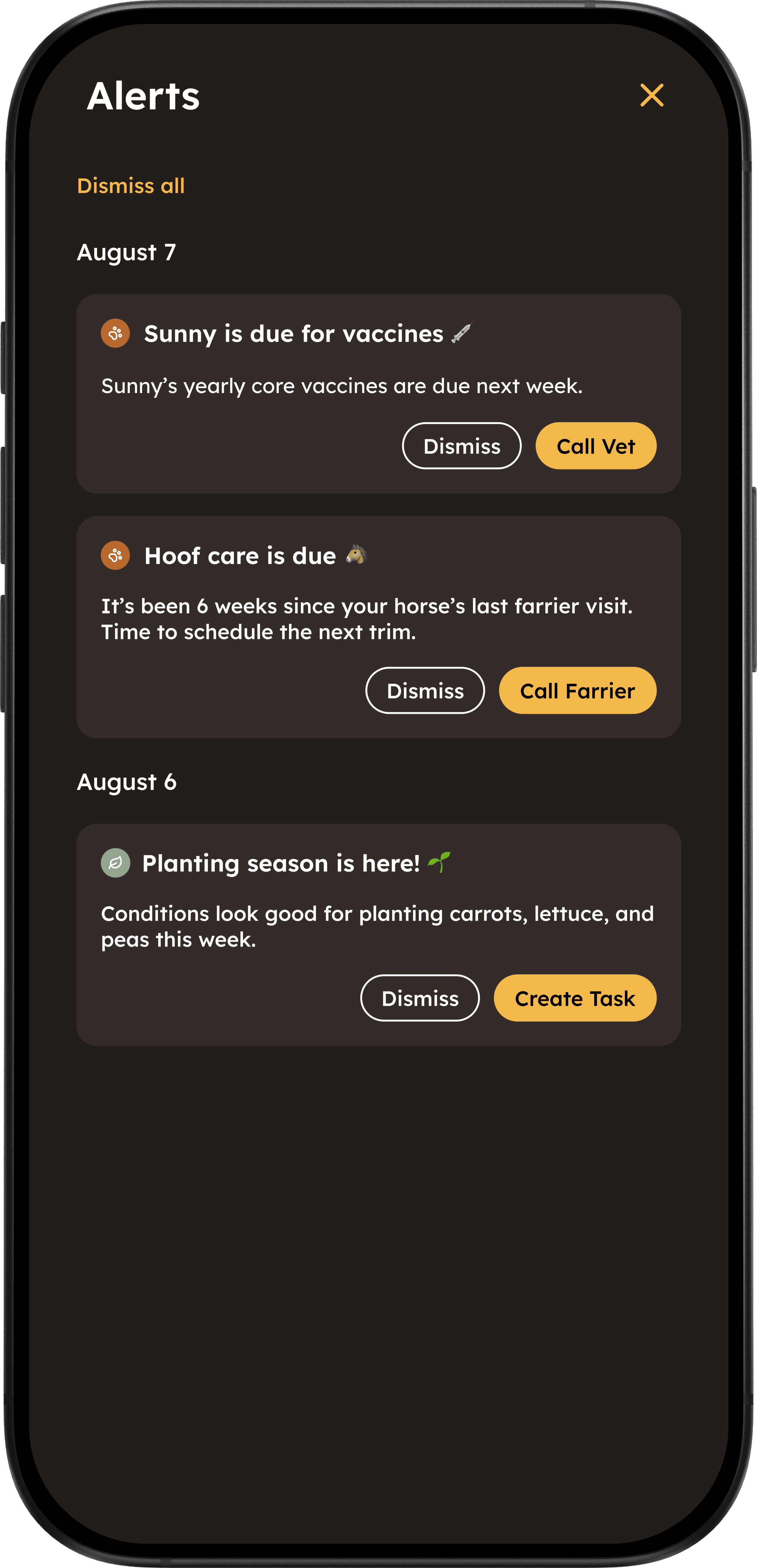
Serving as a central place to manage daily responsibilities, the dashboard prioritizes the tasks and information that need attention and reduces the mental effort required to remember recurring care responsibilities.
Homesteady surfaces current and upcoming tasks, such as:
Vaccination schedules
Feeding reminders
Seasonal planting windows
Weather alerts
Maintenance tasks
Follow-up observations


Weather-Aware Intelligence
Weather-Aware Intelligence
Homesteady connects local weather conditions with relevant actions for the user’s animals, crops, and property.

AI Homestead Assistant
Homesteady is built around a conversational assistant that makes getting help feel natural and intuitive. Users can ask questions through text, voice, or images, and receive potential causes, helpful observations to make, clear next steps, and guidance on when to consult a veterinarian. For urgent situations, Homesteady provides prominent warnings to seek veterinary care and makes it easy to access a saved emergency vet contact.


Animal Profiles
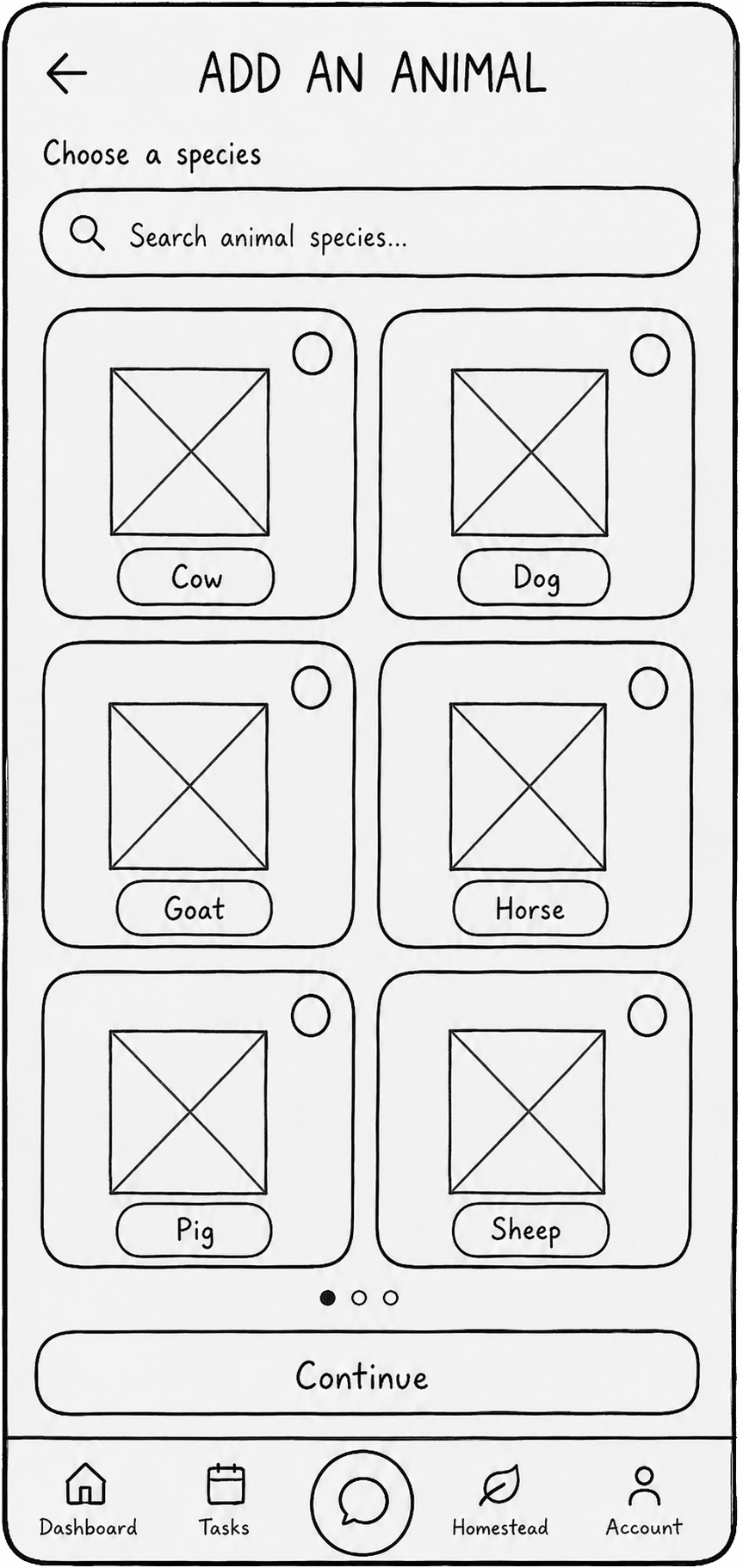
Users can create individual animal profiles with details such as name, breed, age, weight, and feeding schedule. They can also track supplements, weight changes, vaccinations, and deworming, giving Homesteady the context it needs to provide more personalized and relevant recommendations over time.


Visual Animal Health Assessment
Visual Animal Health Assessment
Users can upload an animal photo and provide additional context to help troubleshoot common health and care issues. Homesteady considers visible condition indicators, breed characteristics, age, user-provided medical history, and seasonal or environmental factors to offer potential explanations and next steps. When appropriate, the assistant can also recommend over-the-counter remedies with convenient purchase links.


Personalized Garden Planning
During onboarding, Homesteady learns about each user’s location, growing conditions, garden, experience, and plant preferences to provide personalized recommendations, planting windows, care guidance, and seasonal reminders. Users can also create crop profiles to track ongoing care such as watering, fertilizing, planting dates, maintenance, and pest control.


Crop Assessment and Garden Support
Users can upload crop photos for the homestead assistant to identify potential issues such as leaf damage, pests, or fungal disease. The assistant provides possible causes, recommended treatments, and prevention tips, while creating follow-up tasks and reminders to help users resolve and monitor the issue.


Future Impacts & Opportunities
Future Impacts & Opportunities
Helping people care more confidently for the things they love
Homesteady is designed to help users:
Make more informed care decisions
Notice potential concerns earlier
Reduce uncertainty during unfamiliar situations
Spend less time searching across fragmented resources
Avoid preventable mistakes
Build knowledge through everyday care
Feel supported when experts are not immediately available
Helping people care more confidently for the things they love
Homesteady is designed to help users:
Make more informed care decisions
Notice potential concerns earlier
Reduce uncertainty during unfamiliar situations
Spend less time searching across fragmented resources
Avoid preventable mistakes
Build knowledge through everyday care
Feel supported when experts are not immediately available
Expanding Homesteady into a complete homestead operating system
Future concepts include:
Community knowledge sharing
Smart sensor integrations
Automated irrigation controls
Feed and supply inventory tracking
Long-term livestock health trends
Drone and photo-based property monitoring
Integrations with veterinary and agricultural professionals
Expanding Homesteady into a complete homestead operating system
Future concepts include:
Community knowledge sharing
Smart sensor integrations
Automated irrigation controls
Feed and supply inventory tracking
Long-term livestock health trends
Drone and photo-based property monitoring
Integrations with veterinary and agricultural professionals
Reflection
Reflection
Designing Homesteady allowed me to explore how AI can support more than productivity. It can also help strengthen the relationship between people and the living systems they care for.
The central design challenge was balancing helpfulness with responsibility. The experience needed to offer meaningful guidance without encouraging users to treat an AI suggestion as a diagnosis or substitute for professional expertise
A successful AI companion should not claim to have every answer. It should help users make sense of what they are observing, identify what information matters, recognize when a situation may require expert support, and feel more confident caring for their land, animals, and plants.
Grubhub
Homesteady
Increasing onboarding conversion by 150%
Designing an AI-Powered Companion for Homesteaders
Role: Senior Product Designer
Timeline: 6 months
Team: Product Manager, Engineers, Copy, Sales
Responsibilities: Product strategy, AI interaction design, UX research, conversation design, prototyping, usability testing, developer collaboration and handoff
Role: Product Designer
Project Type: Concept Product / AI Experience Design
Focus Areas: Conversational AI, Mobile UX, AI-Assisted Decision-Making, Information Architecture, Trust & Safety
Tools: Figma, FigJam, Figma Make
Overview
Owning a homestead requires making constant decisions about living systems that do not always provide clear answers.
Is a horse acting differently because of the weather, nutrition, stress, or something more serious?
Is a spot on a plant a harmless imperfection or a fungal disease?
When is the right time to prune, fertilize, vaccinate, or prepare for seasonal changes?
Many hobby farmers and gardeners rely on a fragmented mix of online forums, YouTube videos, spreadsheets, veterinary calls, gardening apps, and knowledge gained through years of experience that newer caretakers may not yet have.
Homesteady is an AI-powered homestead companion designed to bring guidance, organization, and reassurance into one place. It helps users better understand changes in their animals and plants, manage recurring responsibilities, and make more informed care decisions.
Research
Through early concept research and personal experience with small-scale farming, I identified three primary user needs.
1. Immediate guidance when something changes
Animals and plants often communicate through subtle signs. Users need help interpreting:
Changes in behavior
Visible physical symptoms
Environmental conditions
Growth patterns
Weather-related effects
2. Confidence for less-experienced caretakers
New homesteaders frequently question their own judgment:
“Am I overreacting?”
“Is this normal?”
“Should I continue monitoring or call someone?”
They need guidance that reduces uncertainty without creating false confidence.
3. A centralized system for ongoing care
Homestead responsibilities are repetitive but easy to overlook:
Feeding schedules
Vaccinations
Irrigation
Seasonal maintenance
Pasture care
Fertilizing
Pruning
Users need one place to organize the ongoing care of their land, animals, and plants.
Goals
Reduce uncertainty
Help users better understand a situation through guided questions, visual analysis, environmental context, and personalized recommendations.
Make complex information accessible
Translate specialized knowledge into clear, practical next steps.
Build trust through transparency
AI recommendations should explain:
What the system observed
What information influenced the suggestion
What information may still be missing
When professional support is recommended
Support, not replace, experts
Position AI as a first line of support that helps users observe more carefully, ask better questions, and make informed decisions about when to involve a professional.
Exploring Directions
I explored several directions for creating an AI experience that felt helpful, transparent, and trustworthy without overwhelming users with technical complexity.
Across concepts, I focused on making AI reasoning and uncertainty visible, using familiar agricultural language, and surfacing relevant care tasks at the right time. The experience also needed to keep users in control, allowing them to review, adjust, dismiss, or defer AI-generated recommendations.
These principles shaped an experience that balanced AI assistance with human judgment. Rather than presenting recommendations as definitive answers, the product was designed to distinguish observations from possibilities, communicate appropriate safety guidance, and provide clear pathways to professional support when needed.
Validation & Testing
Testing for trust, not just usability
Because Homesteady supports animal and plant care decisions, I wanted to understand not only whether users could complete tasks, but whether the AI felt clear, trustworthy, and appropriately cautious. I conducted moderated concept testing with 6 animal owners, gardeners, and hobby farmers across a range of experience levels.
Guided questions increased confidence: 5 of 6 participants preferred answering follow-up questions before receiving possible explanations. Experienced users wanted the ability to skip questions they had already answered.
Confidence scores created false certainty: 4 participants interpreted “high confidence” as a confirmed diagnosis.
Users wanted to understand why: Participants trusted recommendations more when they could see which symptoms, images, weather, and profile information informed the response.
Safety guidance needed more prominence: 3 participants initially overlooked the recommendation to contact a veterinarian.
AI recommendations needed to stay editable: Users wanted reminders to adapt to their own routines or professional guidance.
Participants completed four key scenarios:
Animal health: Describe a lethargic horse and decide what to monitor or whether to call a vet.
Photo analysis: Review an AI assessment of a possible skin condition and understand its uncertainty.
Care reminders: Turn an AI recommendation into an editable follow-up task.
Dashboard: Prioritize and complete upcoming animal, garden, and weather-related tasks.
Key Findings
What I tested
How Testing Changed the Product
Testing shifted Homesteady away from presenting AI as a diagnostic authority and toward a guided decision-support system. The strongest trust signal wasn’t certainty—it was transparency. Users valued an assistant that helped them understand what they knew, identify what was missing, and decide what to do next while keeping them in control.
UX Principles
Visibility of System Status
Users need reassurance that the system is actively processing their information and an understanding of what it is considering.
Design approach:
Display progress while images are being reviewed
Show which symptoms, profile details, and environmental factors are being considered
Clearly distinguish observations from possible explanations
Communicate uncertainty in plain language
Match Between the System and the Real World
The product should use language and workflows that reflect how farmers and gardeners naturally think. The experience avoids technical system language in favor of familiar agricultural terminology and task-based instructions.
Example: “Add an animal” instead of “Create livestock profile”
Error Prevention and Safety
Recommendations involving living things require safeguards that reduce the risk of delayed care, misinterpretation, or overreliance on AI.
Design considerations:
Clear emergency warnings
Visible product limitations
Professional escalation pathways
Follow-up questions before offering guidance
Language that avoids presenting possibilities as confirmed diagnoses
User Control and Freedom


Users remain in control of AI-generated suggestions and actions.
Users can:
Edit AI-generated reminders
Adjust suggested schedules
Dismiss recommendations
Continue monitoring instead of taking immediate action
Choose whether information is shared with a professional
Example:
User: My horse seems uncomfortable and has been less active today.
AI: “Would you like to contact your veterinarian or continue monitoring him?”
Recognition Rather Than Recall
The experience reduces the mental effort required to remember recurring care responsibilities.
Homesteady automatically surfaces:
Vaccination schedules
Feeding reminders
Seasonal planting windows
Weather alerts
Maintenance tasks
Follow-up observations
Example:
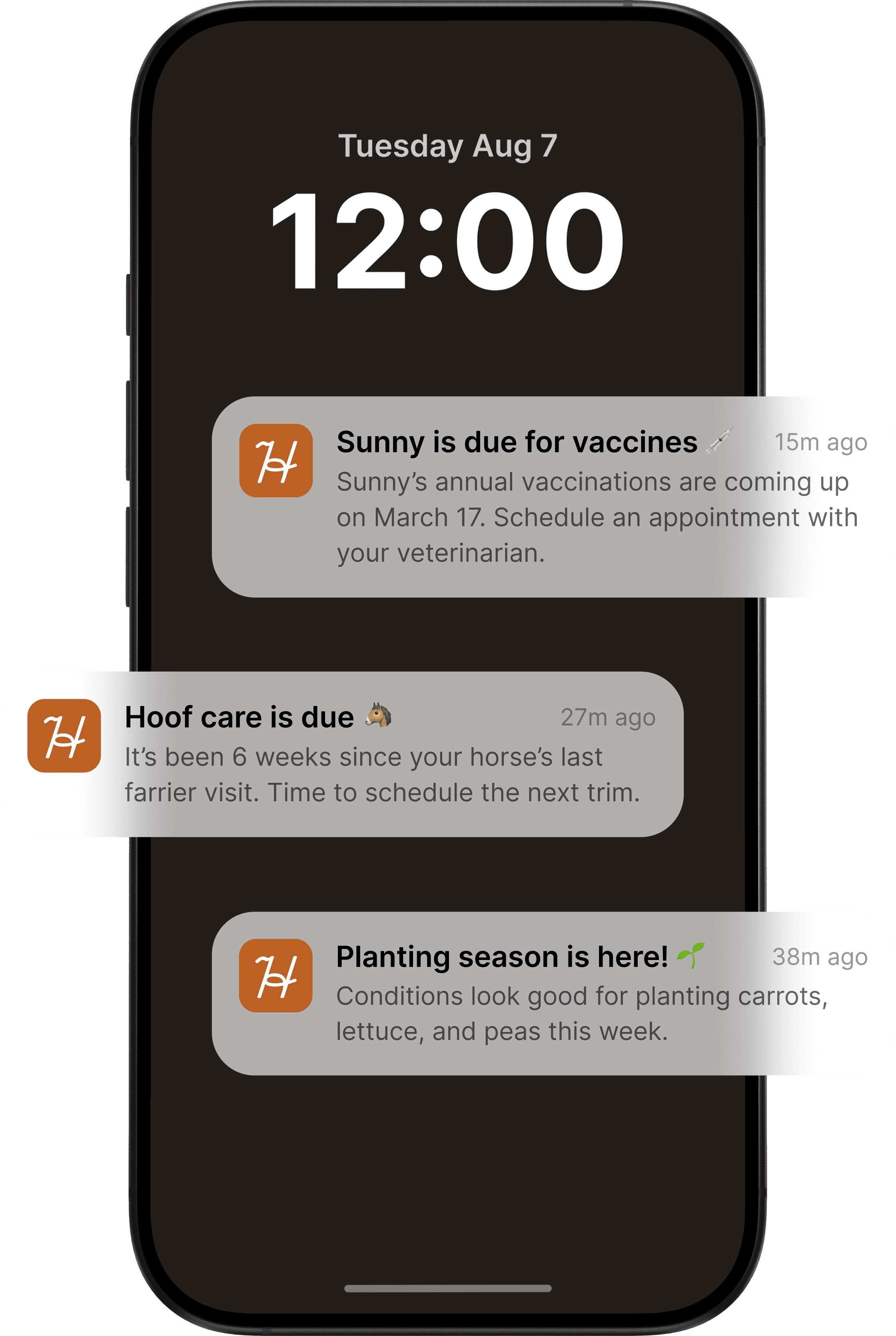
AI:“Sunny is due for annual vaccinations. Would you like to contact your veterinary office?” [Call Veterinary Office] [Set Reminder]


AI Trust & Safety Considerations
Because Homesteady provides guidance about living things, responsible AI design is central to the experience.
Communicate limitations clearly
“I can provide general guidance and help you document what you are observing, but I cannot diagnose a medical condition.”
Encourage professional support
“This may require professional evaluation. Contact your veterinarian for guidance.”
Avoid false certainty
The experience uses:
Plain-language uncertainty
Evidence-based explanations
Follow-up questions
Professional escalation pathways
Clear distinctions between observations and possible explanations
Prioritize urgent guidance
When potentially serious symptoms are reported, the system surfaces emergency actions before general educational information.
The New Experience
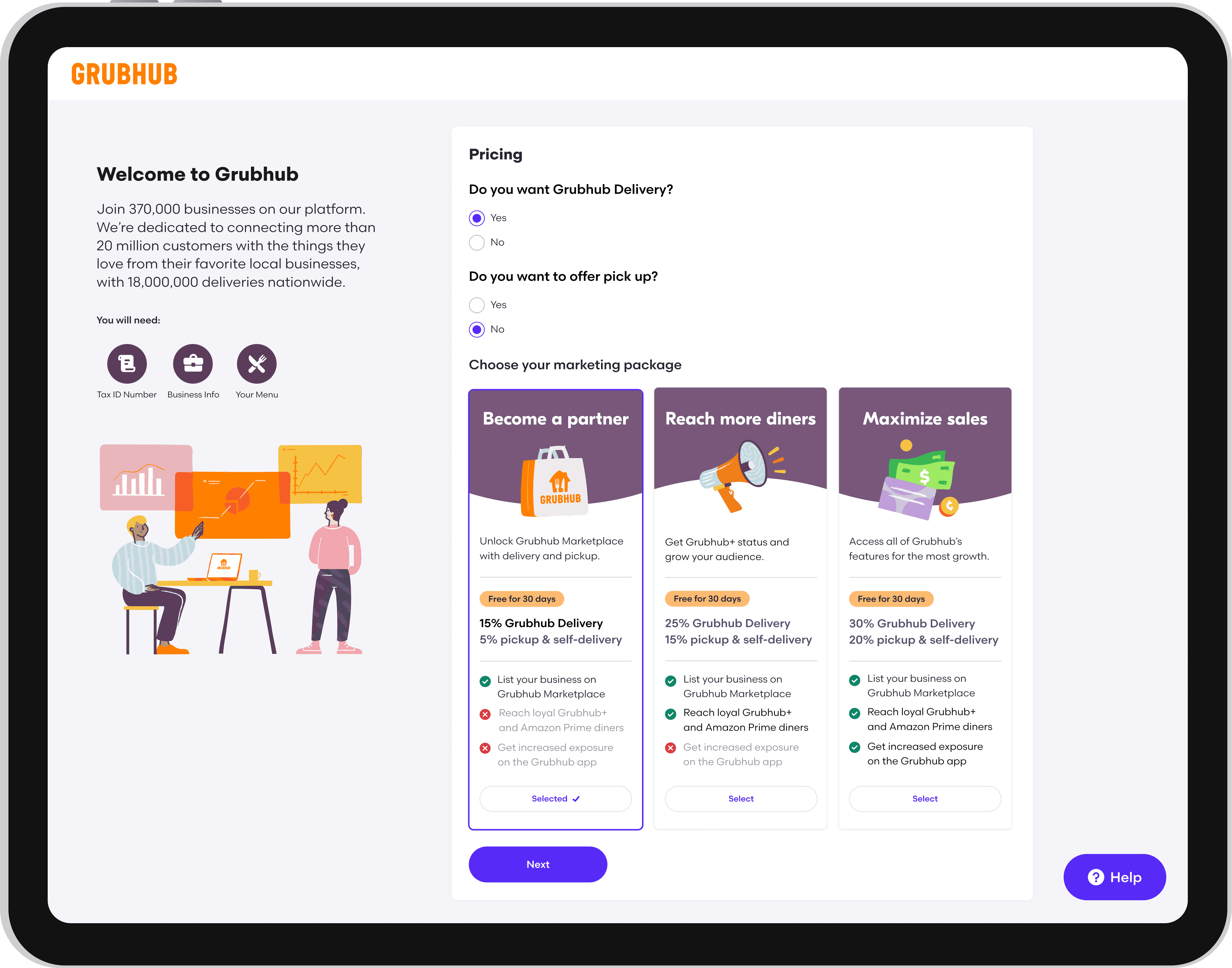
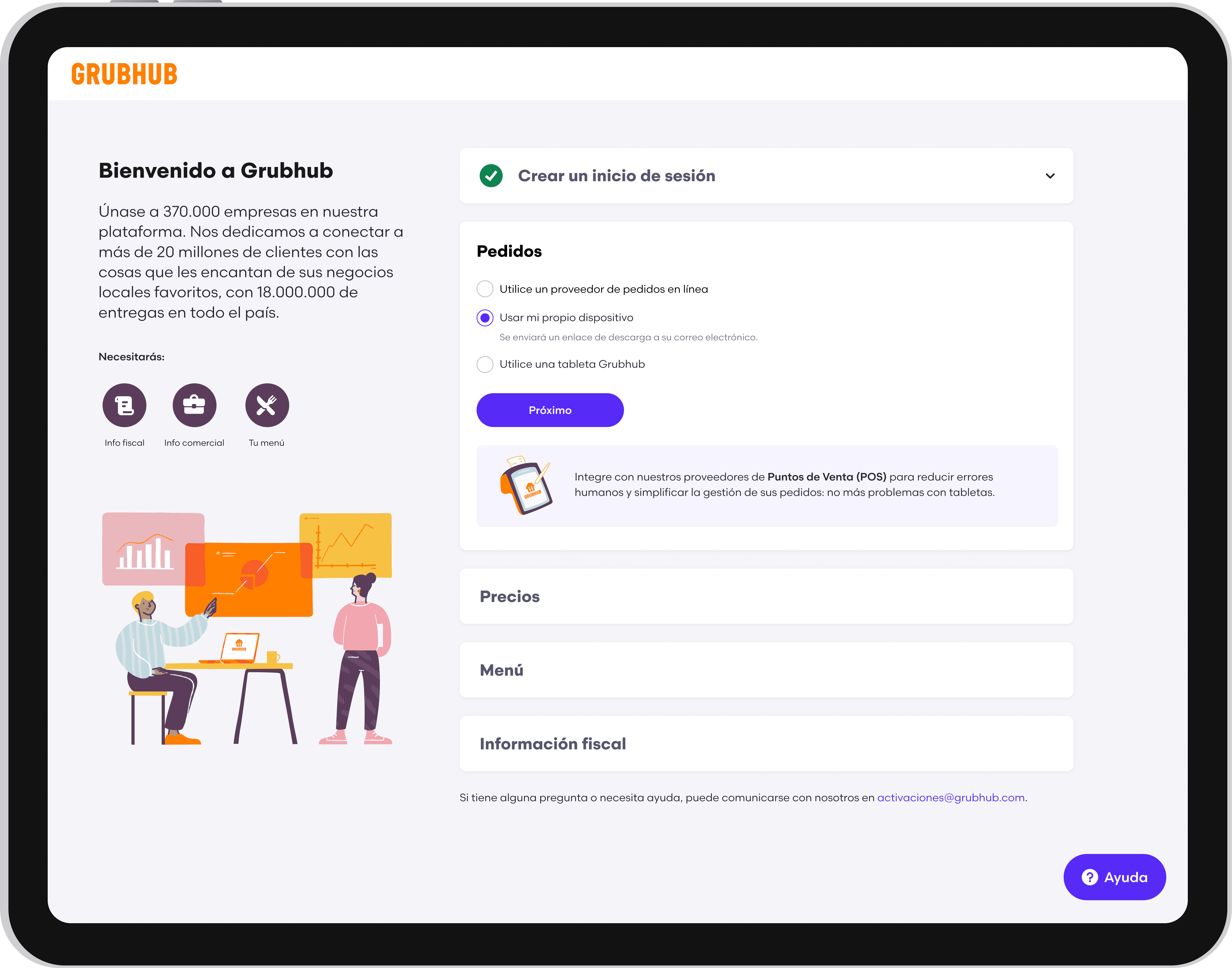
I redesigned pricing around three outcome-oriented plans:
Become a Partner
Reach More Diners
Maximize Sales
Each option included a scannable comparison of features, exclusions, fees, and expected value. A 30-day free trial reduced the perceived risk of selecting a plan.
Rather than presenting pricing as an isolated transactional decision, the experience connected each plan to the merchant’s business goals.
Transparent Plan Selection
Upfront Requirements
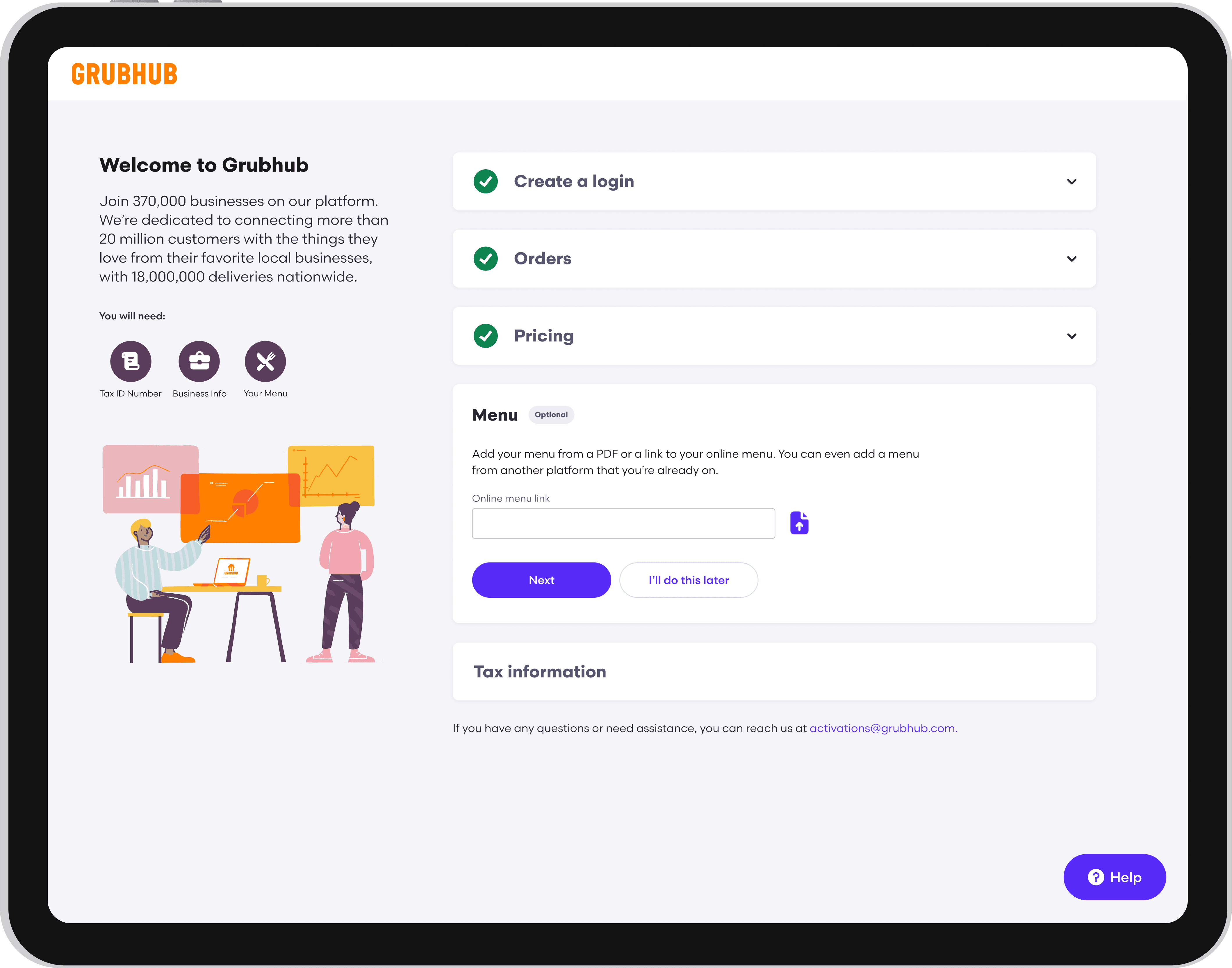
Before beginning, merchants received a clear overview of:
Expected completion time
Information and documents they would need
Required and optional sections
What would happen after submission
This helped merchants prepare before entering the flow and reduced unexpected interruptions.Rather than presenting pricing as an isolated transactional decision, the experience connected each plan to the merchant’s business goals.
Flexible Completion
Nonessential steps could be skipped and completed later within Grubhub for Restaurants.
This allowed merchants to make progress even when they did not have every piece of information available, while preserving the requirements necessary to activate their account.
Multilingual Onboarding
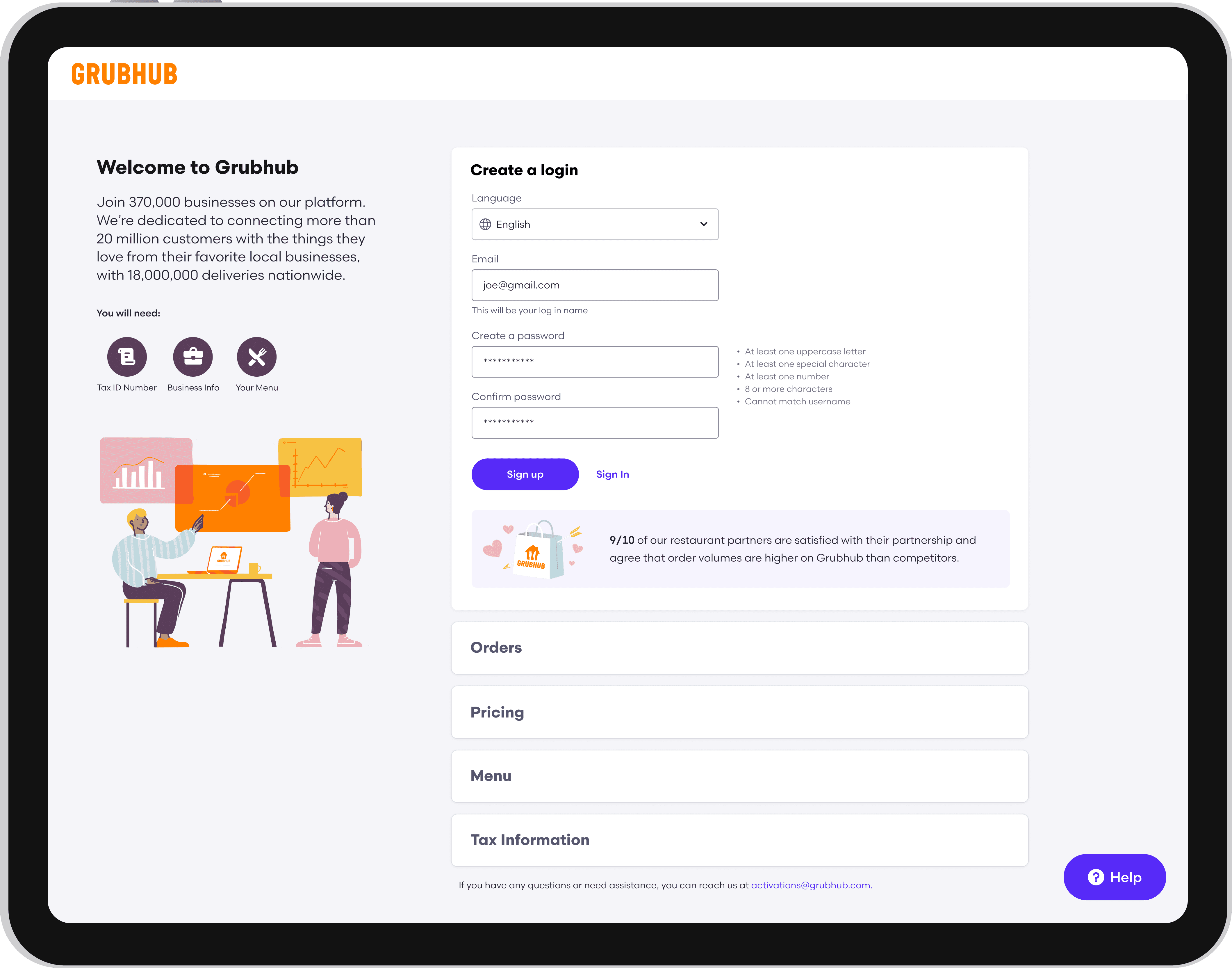
Merchants could select their preferred language from the initial signup page, translating the full onboarding experience into the languages most commonly used by Grubhub’s merchant community.
Translation was integrated into the experience architecture rather than added as a page-level workaround, creating a consistent journey from signup through completion.
AI Guidance
I designed GrubBot, an AI-assisted onboarding companion that provided contextual support without requiring merchants to leave the flow.
GrubBot could:
Explain unfamiliar requirements
Answer frequently asked questions
Clarify terminology
Direct merchants to the appropriate section
Provide structured prompts based on where they were in the process
To make the assistant predictable and trustworthy, I designed clear entry points, constrained response paths, and contextual recommendations rather than relying solely on an open-ended chat interface.
The interaction model was refined through iterative testing to ensure that AI assistance complemented the core experience instead of becoming another layer merchants had to understand.

Responsive Access
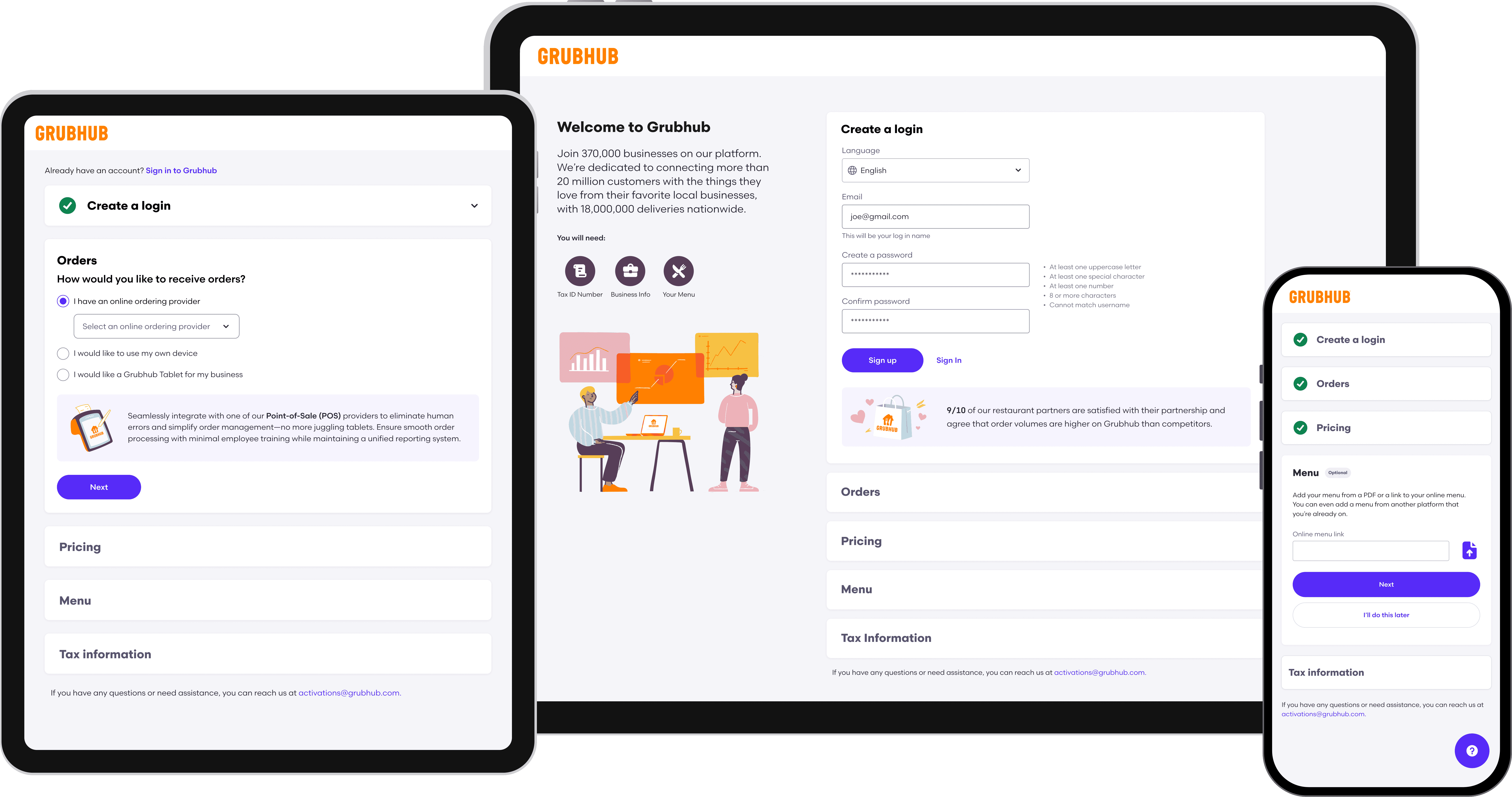
The redesigned flow supported desktop, tablet, and mobile devices. This was particularly important for restaurant operators, who often manage their businesses away from a desk and may need to complete onboarding between operational tasks.
Responsive layouts preserved hierarchy, progress visibility, and editing functionality across screen sizes.
The Opportunity
Growing interest in small-scale homesteading creates new challenges
More people are raising backyard livestock, growing their own food, and pursuing self-sufficient lifestyles. However, many new hobby farmers encounter the same barriers:
Limited access to experienced mentors
Difficulty identifying health concerns early
Uncertainty about care schedules
Information scattered across multiple sources
Anxiety about making costly or harmful mistakes
Traditional resources often answer isolated questions. Homesteaders need guidance that considers the broader context of their specific animals, plants, environment, experience level, and routines.
How might we help homesteaders confidently care for their animals, crops, and property and stay on top of ongoing tasks?
Future Impacts & Opportunities
Helping people care more confidently for the things they love
Homesteady is designed to help users:
Make more informed care decisions
Notice potential concerns earlier
Reduce uncertainty during unfamiliar situations
Spend less time searching across fragmented resources
Avoid preventable mistakes
Build knowledge through everyday care
Feel supported when experts are not immediately available
Expanding Homesteady into a complete homestead operating system
Future concepts include:
Community knowledge sharing
Smart sensor integrations
Automated irrigation controls
Feed and supply inventory tracking
Long-term livestock health trends
Drone and photo-based property monitoring
Integrations with veterinary and agricultural professionals
Reflection
Designing Homesteady allowed me to explore how AI can support more than productivity. It can also help strengthen the relationship between people and the living systems they care for.
The central design challenge was balancing helpfulness with responsibility. The experience needed to offer meaningful guidance without encouraging users to treat an AI suggestion as a diagnosis or substitute for professional expertise
A successful AI companion should not claim to have every answer. It should help users make sense of what they are observing, identify what information matters, recognize when a situation may require expert support, and feel more confident caring for their land, animals, and plants.
Core Experience
Homesteady is built around a conversational assistant that makes getting help feel natural and intuitive. Users can ask questions through text, voice, or images, and receive potential causes, helpful observations to make, clear next steps, and guidance on when to consult a veterinarian. For urgent situations, Homesteady provides prominent warnings to seek veterinary care and makes it easy to access a saved emergency vet contact.
AI Homestead Assistant
Visual Animal Health Assessment
Users can upload an animal photo and provide additional context to help troubleshoot common health and care issues. Homesteady considers visible condition indicators, breed characteristics, age, user-provided medical history, and seasonal or environmental factors to offer potential explanations and next steps. When appropriate, the assistant can also recommend over-the-counter remedies with convenient purchase links.
Crop Assessment and Garden Support
Users can upload crop photos for the homestead assistant to identify potential issues such as leaf damage, pests, or fungal disease. The assistant provides possible causes, recommended treatments, and prevention tips, while creating follow-up tasks and reminders to help users resolve and monitor the issue.
Personalized Garden Planning
During onboarding, Homesteady learns about each user’s location, growing conditions, garden, experience, and plant preferences to provide personalized recommendations, planting windows, care guidance, and seasonal reminders. Users can also create crop profiles to track ongoing care such as watering, fertilizing, planting dates, maintenance, and pest control.
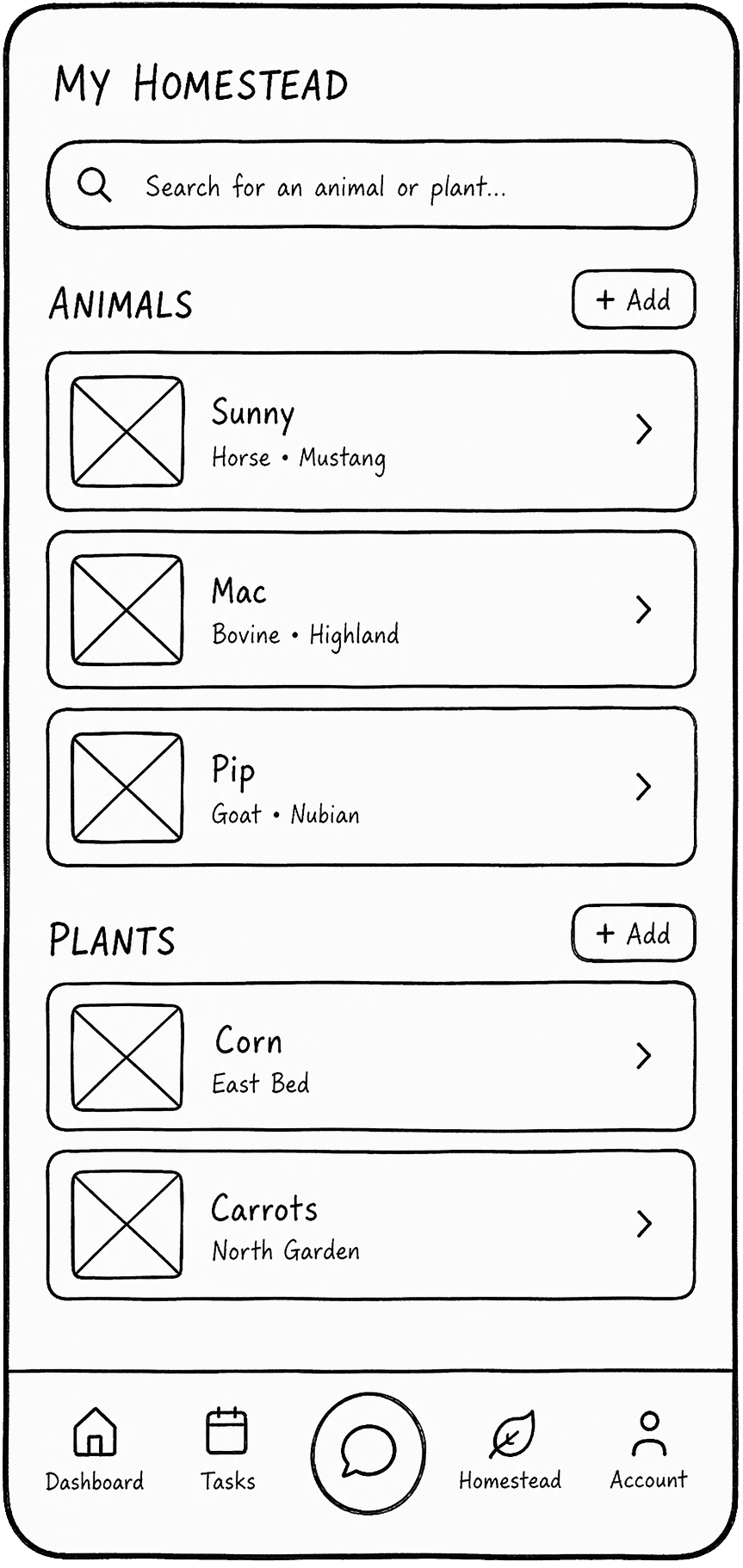
Serving as a central place to manage daily responsibilities, the dashboard prioritizes the tasks and information that need attention and reduces the mental effort required to remember recurring care responsibilities.
Homesteady surfaces current and upcoming tasks, such as:
Vaccination schedules
Feeding reminders
Seasonal planting windows
Weather alerts
Maintenance tasks
Follow-up observations
Homestead Management Dashboard
Weather-Aware Intelligence
Homesteady connects local weather conditions with relevant actions for the user’s animals, crops, and property.
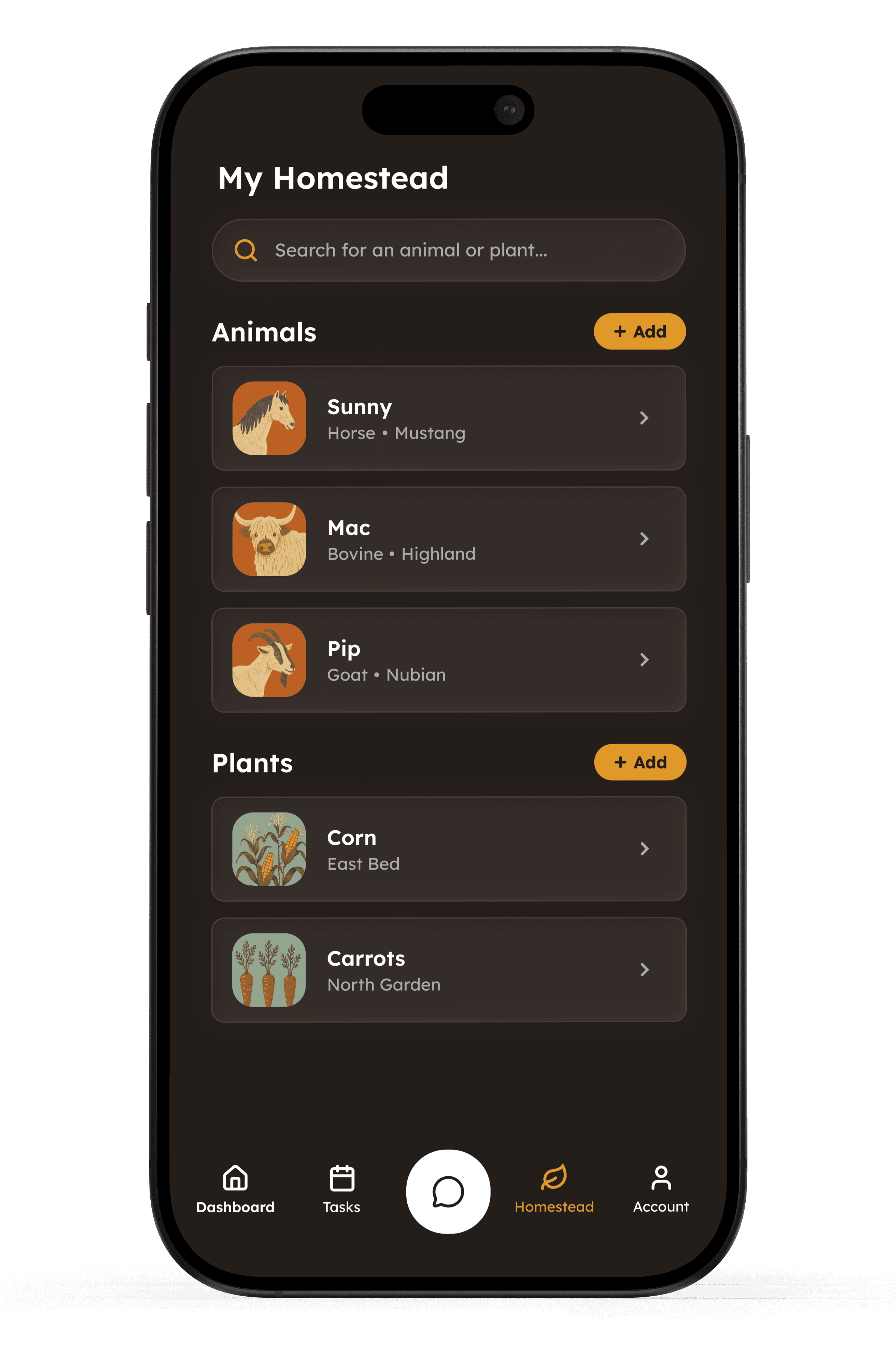
Animal Profiles
Users can create individual animal profiles with details such as name, breed, age, weight, and feeding schedule. They can also track supplements, weight changes, vaccinations, and deworming, giving Homesteady the context it needs to provide more personalized and relevant recommendations over time.



Care Network
Users can save and access information for:
Veterinarians
Farriers and hoof trimmers
Agricultural consultants
Nurseries
Farm sitters
Care Network